Artstation - Skatetron - 教程
这是一个关于建模、展UV、纹理绘制和渲染滑板机器人的完整流程教程。
(时长 10 小时 49 分钟,无旁白视频)。
如果您准备好深入学习我们最新的教程,那就准备好您的工具吧!
在本视频中,我们将向您展示如何从零开始创建 Skatetron 机器人。本教程分为六个部分:
- 建模(时长:8 小时 2 分钟)
建模过程主要在 Plasticity 中完成(90%),
然后我们使用 Blender 3.6.0 中的 H-Ops 插件和 Cablerator 插件添加了一些细节(10%)。
- 优化(时长:1 小时 18 分钟)
优化过程在 Blender 3.5.0 中完成。
- 展UV(时长:17 分钟)
我们在 Blender 3.6 中使用了智能 UV 展开功能,然后在 Unfold 3D 中对部分区域进行了修正。
- 纹理绘制、渲染和后期处理(时长:4 小时 25 分钟、1 小时 10 分钟和 10 分钟)
纹理绘制使用 Substance 3D Painter 完成,渲染在 Blender 3.5.0 (Cycles) 和 3ds Max 2021 (V-ray 5) 中完成。
我们使用各种技术从零开始创建了所有材质,以获得更丰富的细节。
最后,我们使用 Adobe Firefly(添加烟雾效果)和 Photoshop 中的 Nik Collection 插件进行了一些后期处理,使其渲染效果更加引人注目!
顶点数:85,628
面数:89,963
使用的软件:
Blender
Rizom UV unfold3d
Substance 3D Painter
Blender/Cycles
3DS-Max/Vray
Photoshop/Nik Collection
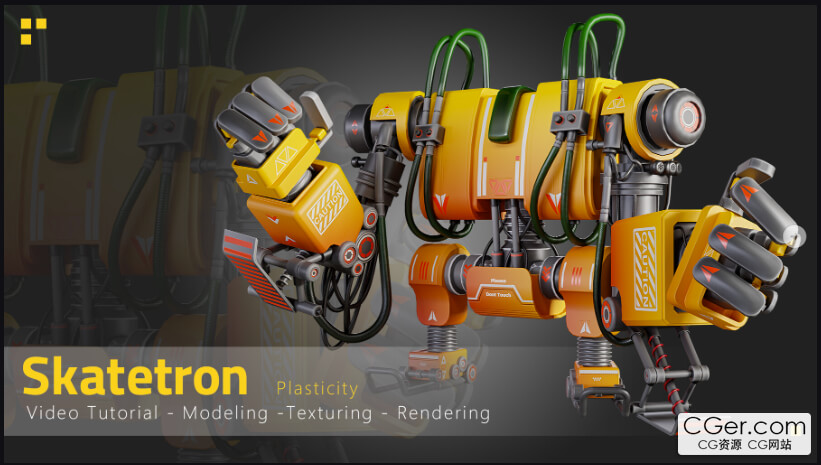
This is a full process tutorial of Modeling, Unwrapping, Texturing and Rendering our Skatetron
(10 hours and 49 minutes unnarrated video).
If you're ready to dive deep into our latest tutorial, get your tools out!
In this video, we show you how to create a Skatetron Robot from scratch. The tutorial is divided into Six sections :
-Modeling (Duration: 8 hours and 2 minutes)
The modeling process was done in Plasticity(90%)
then we add some details in Blender 3.6.0 using the H-Ops add-on and cablerator add-on(10%)
-Optimizing (Duration: 1 hour and 18 minutes)
Optimizing was done in Blender 3.5.0.
-Unwrapping (Duration:17 minutes)
We used smart Uv in blender 3.6 then we correct some parts in unfold 3d.
-Texturing & Rendering & Post-Processing (Duration:4hours and 25minutes & 1hours and 10minutes & 10minutes )
Texturing was done with Substance 3D Painter, rendering has done in Blender3.5.0(Cycles) and 3ds Max 2021(V-ray5)
We created all materials from scratch using various techniques for more detail.
At the end of it all, we did some post-processing work with Adobe Firefly(adding smoke) and Nik Collection Plugin on Photoshop to give it that extra attractive render!
Vertices:85.628
Polys:89.963
Attention : we put model in standard license so you get both tutorial and model.
Attention : all videos are unnarrated ( it means there are no voice-over videos or subtitles )
Software Used:
Blender
Rizom UV unfold3d
Substance 3d Painter
Blender/cycles
3DS-Max/Vray
Photoshop/Nik collection
描述:
标签: 建模 材质 贴图 纹理 教程分类:教程 > 3D教程 > Blender
发布:CGer | 查看: | 发表时间:2026/1/6 21:30:47 | 更新时间:2026/1/6 21:35:23
○ 充值或账号问题请【点击这里联系站长】 |


点击消耗 10 CG点(约 1.0 元)解锁 30个通用资源, 24小时内有效!(有效期内不重复扣点)



| 常见问题,点击查询: | ||
| ●CGer(Cg儿)资源下载帮助 | ||
| ●资源名词解释 | ||
| ●注册/登陆问题 | ||
| ●充值出错/修改密码/忘记密码 | ||
| ●充值赠送系统 | ||
| ●文件解压出错/解压密码 | ||
| ●Payment with Paypal | ||
| ●哪些资源会被列为付费资源 | ||
| ●为何要充值解锁 | ||
| ●免责条款 | ||
| ●联系站长(联系站长前请先仔细阅读 免责条款 ,网站只提供资源,不提供软件安装等服务!) | ||