Artstation - IMM Brush «Snake» for Zbrush - zb笔刷
插入多网格笔刷「蛇」采用 ZBrush 4r8p2 版本制作。
文件: SNAKE.ZBP
笔刷具有两种模式: 蛇口张开和蛇口闭合。按 M 键切换模式。
笔刷由低多边形网格构成。 在交互模式下,您可以添加平滑细分级别(几何体 > 动态细分)。
建议: 在最低细分级别下工作,待蛇的位置达到满意后,再添加(并应用)一个细分级别。
在笔刷模式下,您可以更改一些参数:
Lock And、Lock Start(笔触面板 > 笔触): 可冻结蛇头或蛇尾,方便操作。
Snap(笔触面板 > 笔触): 吸附到表面。
Max Bend Angle(笔刷面板 > 修改器): 影响蛇的柔韧性(如果设置的角度过大,弯曲效果会不太美观)。
有一个特性需要注意: 只有在将蛇分离为独立的子工具后,才能添加实际的细分级别(工具 > 几何体 > 细分),如果不进行分离,分区将不会被平滑处理!
强烈建议: 将此笔刷与 CurvesHelper 插件配合使用。
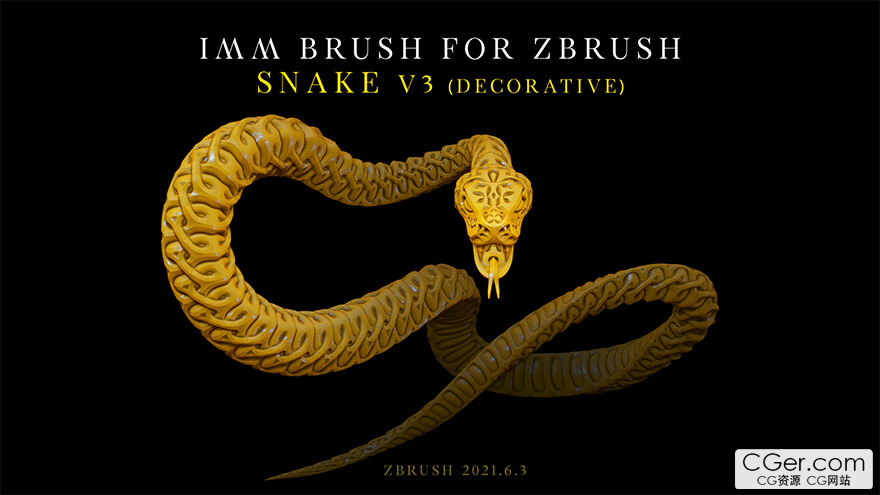
Insert multi-mesh brush «Snake» is made in ZBrush version 4r8p2.
File: SNAKE.ZBP
The brush has two modes: snake with an open mouth and snake with a closed mouth. Switch modes by pressing the M key.
The brush consists of a low polygonal mesh. In interactive mode, you can add smooth subdivision levels (Geometry > Dynamic Subdiv).
I recommend working at the lowest subdivision level, and after reaching the acceptable position of the snake, add a subdivision level (and apply it).
In brush mode, you can change some parameters:
Lock And, Lock Start (Stroke palette > Stroke): Allows you to freeze the head or tail for easy operation.
Snap (Stroke palette > Stroke): Snaps to the surface.
Max Bend Angle (Brush palette > Modifiers): Affects the flexibility of the snake (if you set a large angle, the bends may not look very good).
There is one peculiarity: you can add actual subdivision levels (Tool > Geometry > Divide) only after separating the snake into a separate subtool. If this is not done, the subdivision will not be smoothed!
I highly recommend using the CurvesHelper plugin with this brush.
描述:
标签: zb zbrush 笔刷 资源 素材分类:资源 > 3D资源 > Zbrush笔刷预设
发布:CGer | 查看: | 发表时间:2026/5/18 21:27:10 | 更新时间:2026/5/18 21:27:10
○ 充值或账号问题请【点击这里联系站长】 |


点击消耗 10 CG点(约 1.0 元)解锁 30个通用资源, 24小时内有效!(有效期内不重复扣点)



| 常见问题,点击查询: | ||
| ●CGer(Cg儿)资源下载帮助 | ||
| ●资源名词解释 | ||
| ●注册/登陆问题 | ||
| ●充值出错/修改密码/忘记密码 | ||
| ●充值赠送系统 | ||
| ●文件解压出错/解压密码 | ||
| ●Payment with Paypal | ||
| ●哪些资源会被列为付费资源 | ||
| ●为何要充值解锁 | ||
| ●免责条款 | ||
| ●联系站长(联系站长前请先仔细阅读 免责条款 ,网站只提供资源,不提供软件安装等服务!) | ||





-
网站置顶/公示帖集合
5 0 0
资源 > 3D资源 > Zbrush笔刷预设
-
网站置顶/公示帖集合
9 0 0
资源 > 3D资源 > Zbrush笔刷预设
-
网站置顶/公示帖集合
35 0 0
资源 > 3D资源 > Zbrush笔刷预设