CHROMiX ColorThink v4.2.0 x64
ColorThink 4 - 最好的现在变得更好。 第 4 版增加了大量功能,并对业界最好的色彩图形和分析工具进行了彻底的现代化改造,同时保留了其熟悉的界面。
色域比较
另一个备受期待的功能是分析和比较两个色域的能力。ColorThink 4 使用色域减法或加法来创建一种全新的图形。例如:当比较 sRGB 和印刷特性文件时,ColorThink 4 会减去印刷特性文件中落在 sRGB 之外的部分。这非常清晰地展示了如果使用 sRGB 作为工作空间,印刷中将无法呈现的颜色。比较功能可以反转减法,从而从 sRGB 色域中减去印刷特性文件。您还可以选择显示共享色域以及完全合并的色域。绘图项检查器会显示两个原始色域各自的色域体积以及比较后的体积。色域比较指数(GCI)也是一个易于理解的数字,并根据 ISO 标准计算。
图像动画
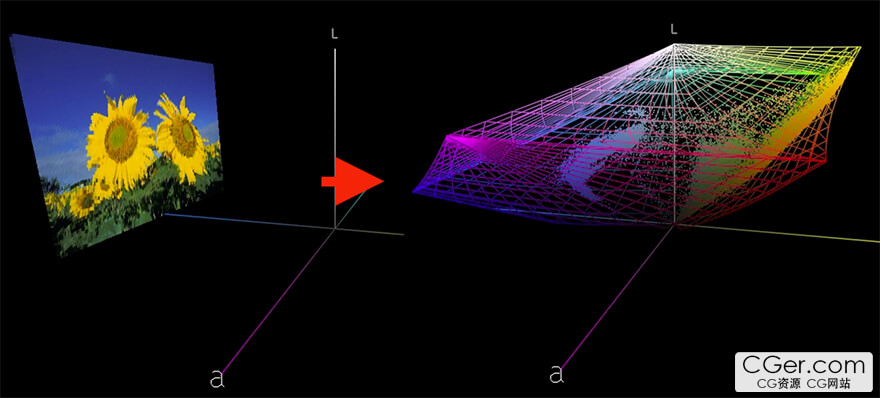
ColorThink 4 提供了一种激动人心的新方式在图形器中显示图像。图像以其正常形式加载,并在正常显示形式与图像颜色在图形器中的 Lab 值之间平滑动画过渡。可以轻松选择以线框形式显示嵌入的特性文件,说明图像颜色如何全部适合其嵌入特性文件的色域。仅此一项功能就能让您的观众惊叹不已,并帮助他们比以往任何可视化方式更快地理解色彩!
色彩资产
这对于那些在不同地方拥有无数特性文件和相关文件的色彩从业者来说是一个巨大的福音。ColorThink 4 组织了所有色彩资产,包括安装在您系统中的特性文件以及您存储在其他位置的资产。您可以通过资产类型、资产的色彩空间甚至任意文本来过滤它们。ColorThink 会收集关于每种资产类型的大量元数据,包括原色、资产类型、色彩空间、色域体积和各种尺寸参数,甚至最大密度值 Dmax。然后您可以按这些值排序,以找到最大色域的特性文件或具有最低 Dmax 的纸张。新的“色彩资产”在组织方面的优势如此强大,您必须亲自体验。此功能将为您节省大量的搜索时间。
白点编辑器
ColorThink 4 中的一个新工具是白点编辑器。修改 ICC 特性文件中的白点是改变打样外观以及其他功能的便捷方法。新的白点编辑器非常灵活,您可以输入 XYZ、Lab 或相关色温值。您还可以将颜色列表或另一个 ICC 特性文件拖放到编辑器中,将使用这些颜色或特性文件的白点来修改原始特性文件的白点。只需简单点击并通过您的色彩测量仪器直接测量真实纸张的颜色,然后将特性文件的白点更改为该颜色。非常强大。
LCH 模式
另一个展开特性文件和其他数据集的有效的坐标空间是 LCH。色相通常像时钟指针一样围绕色环旋转,而在 LCH 模式下被拉伸成一条直线。ColorThink 4 以 LCH 模式绘制图形,允许您从非常不同的角度评估您的颜色。通过这种视图,每种颜色的相对饱和度或彩度可以很容易地比较,因为它们是沿着一条直线来查看的。在此模式下也可以使用替代色彩空间,如 Jab 和 OKLab,因此您可以看到它们如何使饱和度变得更加规则。
Delta-E 球体
我们称之为 Delta E(色差值)的色差计算可能难以解释。ColorThink 4 可以将 Delta E 的概念形象化为颜色周围的球体或球状。Delta E 76 和 Delta E 2000 在颜色目标的接近距离方面有着非常不同的视角和形状。ColorThink 4 将有助于理解这一点。您可以将绘图坐标从 Lab 更改为 Jab 或其他模式,以查看它如何影响这些色差形状。
ColorThink 4 – The Best, Now Better. Version 4 adds tons of features and thoroughly modernizes the industry's best color graphing and analytics tool while retaining its familiar interface.
Gamut Comparison
Also highly anticipated is the ability to analyze and compare two gamuts. ColorThink 4 uses gamut subtraction and/or addition to create an entirely new kind of graph. For example: when sRGB and a press profile are compared, ColorThink 4 subtracts the portion of the press profile that falls outside sRGB. This clearly illustrates the colors achievable on press that would be unavailable if sRGB were your working space. The compare function can reverse the subtraction, so the press profile is subtracted from the sRGB gamut. You can also choose to display the shared gamut in addition to the fully combined gamut. The Plot Item inspector shows the gamut volumes of each of the two original gamuts as well as the comparison volume. The Gamut Comparison Index (GCI) is also an easy number to relate to and is calculated in accordance with the ISO standard.
Image Animation
ColorThink 4 offers an exciting new way to display images in the grapher. Images load in their normal form and smoothly animate between their normal display and the Lab values of the image colors within the grapher. The embedded profile can easily be shown in wireframe, illustrating how all image colors fit within the gamut of their embedded profile. This feature alone will wow your audience and help them grasp color concepts faster than any previous visualization.
Color Assets
This is a huge benefit for color professionals who have countless profiles and related files stored in various locations. ColorThink 4 organizes all Color Assets, including profiles installed in your system as well as other assets stored wherever you keep them. Filter them by asset type, color space, or even arbitrary text. ColorThink harvests extensive metadata for each asset type, including primary colors, asset type, color space, gamut volume, various size parameters, and even the maximum density value (Dmax). You can then sort by these values to find the largest‑gamut profile or the paper with the lowest Dmax. The organizational power of the new Color Assets is so significant you'll have to see it for yourself. This feature will literally save hours of search time.
White Point Editor
One new tool in ColorThink 4 is the White Point Editor. Modifying the white point in an ICC profile is a handy way to alter the appearance of proofs and perform other functions. The new White Point Editor is very flexible, allowing you to enter XYZ, Lab, or correlated color temperature values. You can also drag and drop a list of colors or another ICC profile into the editor; the white point from those will then be used to modify the original profile's white point. With a simple click, you can take a direct measurement from your color instrument to sample a real‑world paper color and change your profile's white point to that color. Very powerful.
LCH Mode
Another effective coordinate space for unfolding profiles and other data sets is LCH. Color hue, which normally travels around the color wheel like the hands of a clock, is stretched out into a straight line. ColorThink 4 graphs in LCH, allowing you to evaluate your color from a very different perspective. In this view, the relative saturation or chroma of each color is now easily compared because they are viewed across a straight line. Alternative color spaces such as Jab and OKLab can also be used in this mode, so you can see how they affect saturation and make it significantly more regular.
Delta‑E Blobs
The color difference calculations we know as Delta‑E can be difficult to explain. ColorThink 4 can illustrate the concept of Delta‑E as blobs or spheres around colors. Delta‑E 76 and Delta‑E 2000 have very different perspectives and shapes regarding the closeness of color targets. ColorThink 4 helps with this understanding. You can change the plotting coordinates from Lab to Jab or other modes to see how it affects these color‑difference shapes.
描述:
标签: 软件 颜色 色彩分类:资源 > 软件资源 > 软件资源:未分类
发布:CGer | 查看: | 发表时间:2026/6/9 20:46:51 | 更新时间:2026/6/9 20:50:13
○ 充值或账号问题请【点击这里联系站长】 |


点击消耗 10 CG点(约 1.0 元)解锁 30个通用资源, 24小时内有效!(有效期内不重复扣点)



| 常见问题,点击查询: | ||
| ●CGer(Cg儿)资源下载帮助 | ||
| ●资源名词解释 | ||
| ●注册/登陆问题 | ||
| ●充值出错/修改密码/忘记密码 | ||
| ●充值赠送系统 | ||
| ●文件解压出错/解压密码 | ||
| ●Payment with Paypal | ||
| ●哪些资源会被列为付费资源 | ||
| ●为何要充值解锁 | ||
| ●免责条款 | ||
| ●联系站长(联系站长前请先仔细阅读 免责条款 ,网站只提供资源,不提供软件安装等服务!) | ||